
I may earn commission if you use my affiliate links to purchase products: More details.
Over the years, I’ve hosted my sites with many managed WordPress hosting providers, including WPX, Cloudways, and Rocket.net. But never personally tried or tested Kinsta. So, I finally decided to test Kinsta’s hosting performance and conduct some benchmark tests.
Kinsta has been serving the hosting industry since 2013 and ranked #1 on G2 for the best WordPress Hosting Platforms.
Kinsta claims to offer high-performance WordPress hosting with CDN and Edge caching. Let’s run some tests to see if it’s true.
Overview of Kinsta
Brand | Kinsta |
Website: | |
Year Founded: | 2013 |
Headquarters: | Los Angeles, California |
Service Types: | WordPress hosting and Application Hosting |
Base Plan: | $35/mo on monthly plans or $30/mo on annual purchase |
Customer Support: | Live Chat, Email support, Docs, and Community forum. |
Data Centers: | 30 data center locations across the world |
Uptime: | 99.99% |
Reliability: | Bot protection, DDoS protection, Daily Backups, and two enterprise firewalls. |
Refund policy: | Kinsta offers a 30-day money-back guarantee |
CDN: | Built-in CDN powered by Cloudflare |
Email hosting: | Not available |
Control Panel: | Custom-built control panel |
Domain Registration: | Not available |
Competitors: |
Kinsta Specifications
Kinsta runs on Google Cloud Platform, which provides powerful, customizable virtual machines, and many hosting companies build their infrastructure on it. You can choose a server from 30 different data center locations worldwide.
Kinsta says it offers 12 CPUs and 8 GB of RAM by default for each live site container. This is a good amount of resources for managed WordPress hosting.
The base plan provides 15 GB of bandwidth per month, 15 GB of storage, and 75,000 estimated visits per month for 1 WordPress install. Additional sites can cost an extra $30/mo per site.
Benchmark Tests
Let’s run some benchmark tests for Kinsta using a couple of WordPress plugins.
Server Performance
First, let’s test the server performance using a plugin called Hosting Benchmarking Tool, which evaluates server performance and provides accurate scores through various tests.
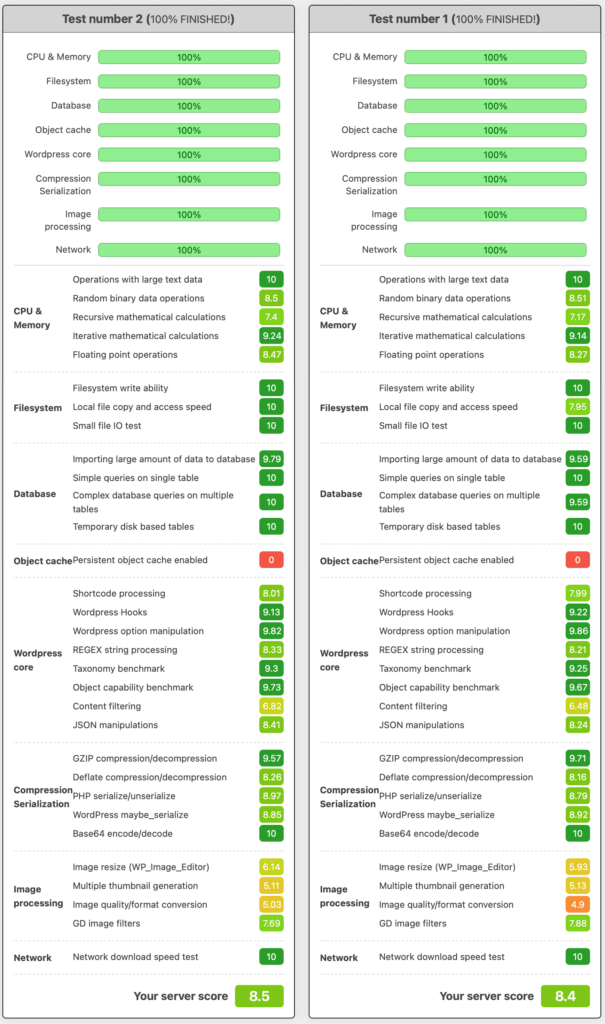
As shown in the above screenshot, I conducted multiple tests to check the server performance of Kinsta.
It performed better than many managed WordPress hosting companies, and you can see the good scores on CPU, Processing Power, Memory Efficiency, disk read and write speeds, Database Operations, etc.
The scores are very close to the netcup root server I use, and the credit goes to Kinsta’s Google Cloud Platform infrastructure.
The only downside is that Kinsta doesn’t offer Redis Object Cache by default, and enabling it costs an additional $100 per month per site. Redis would dramatically improve the performance of dynamic sites such as eCommerce websites.
PHP Vitals
PHP Vitals WordPress plugin analyzes your server by conducting different types of PHP performance tests and displays a grade ranging from A+ to F.
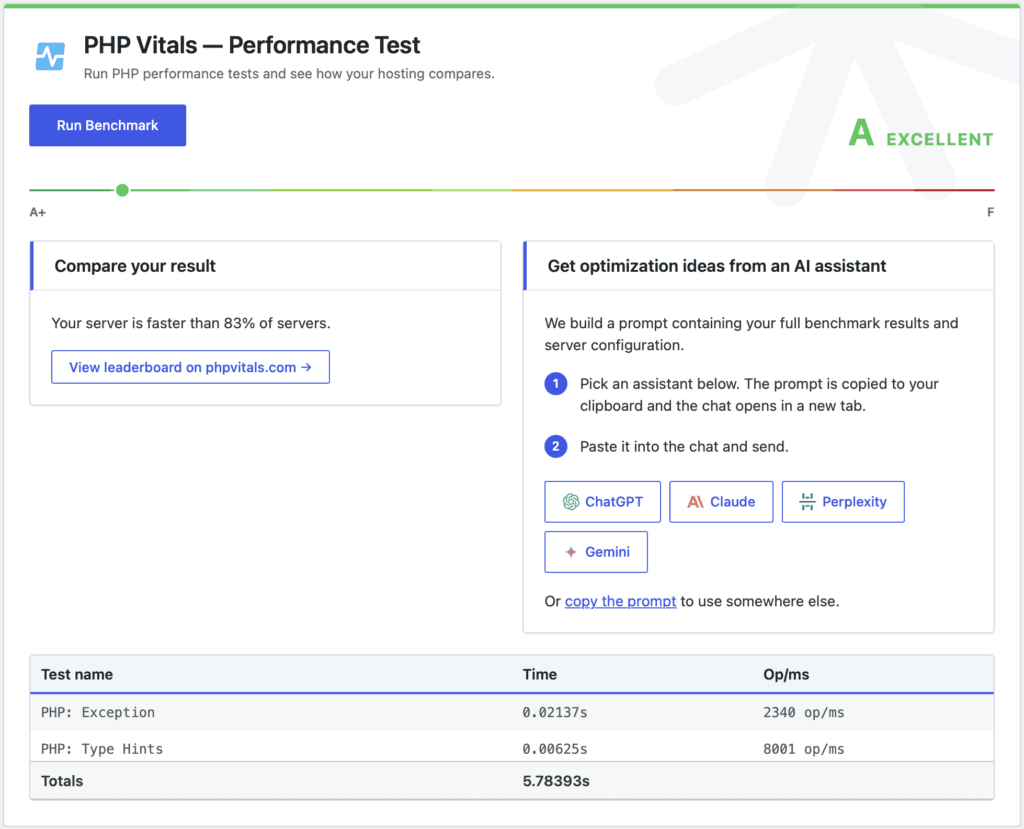
As you can see in the screenshot, Kinsta got an A grade on PHP Vitals. Also, it’s faster than 83% of tested servers.
Speed Test
Kinsta discourages using cache, backup, and other plugins. They say using a cache plugin can deteriorate performance because they use caching at the server level.
Kinsta also enables CDN and page caching by default, so I’ll be using the default settings.
For this speed test, I’ll be using a theme called Twenty Twenty-Four with some page content.
GTmetrix
Let’s test the speed on GTmetrix first.
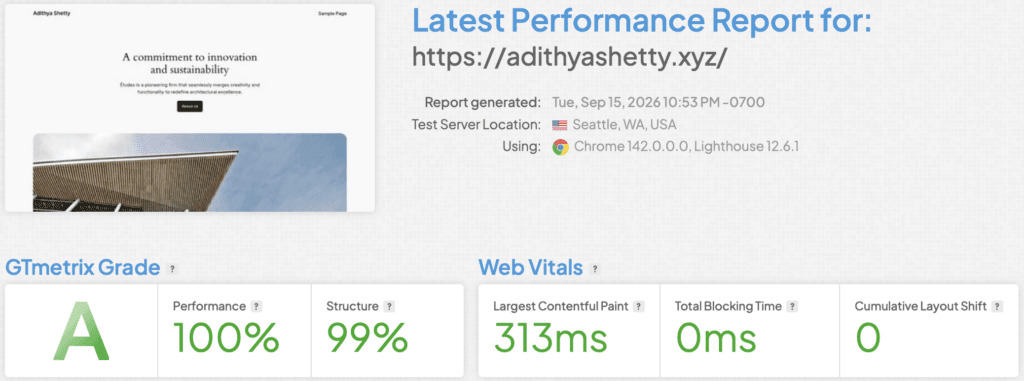
Site hosted on Kinsta scored 100/100 on the GTmetrix performance score.
PageSpeed Insights
PageSpeed Insights is a free tool by Google that tests performance, speed, as well as the user experience of your website.
Since PageSpeed Insights also tests for mobile, I enabled Mobile cache in Kinsta’s Edge Caching settings.
Mobile
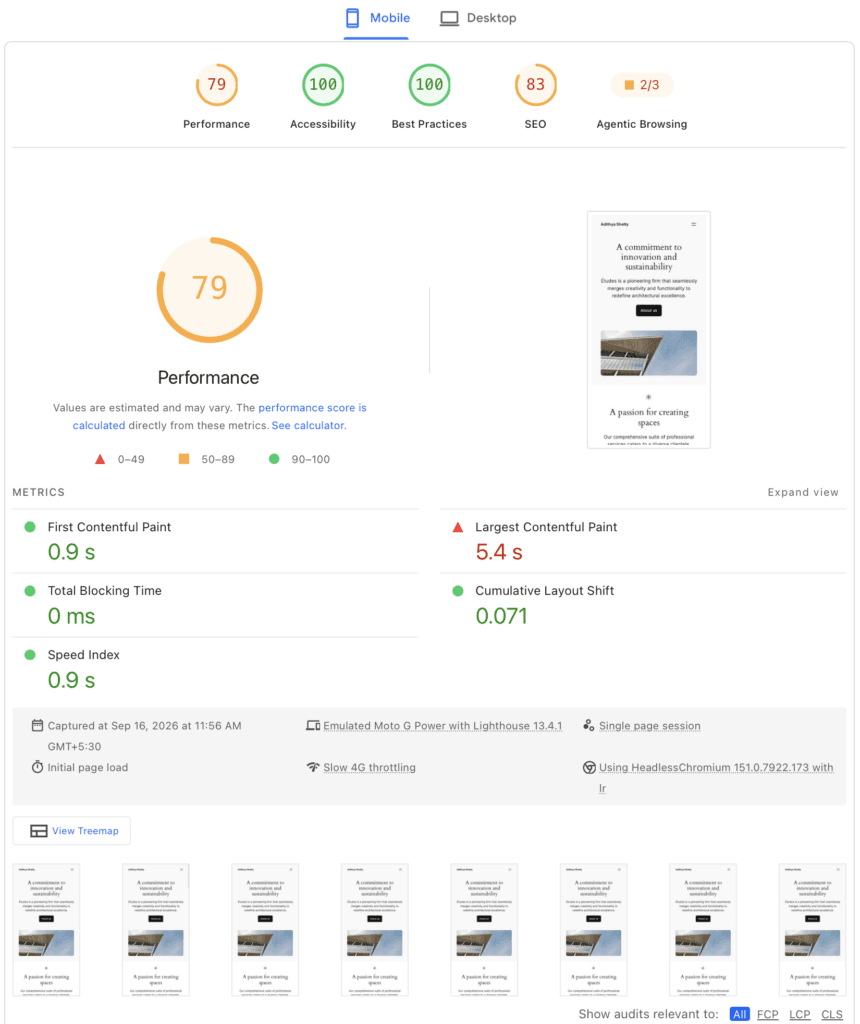
The PageSpeed Insights score on mobile is not bad for the default settings; TTFB is also good, and a few optimization tweaks could increase the scores.
Desktop
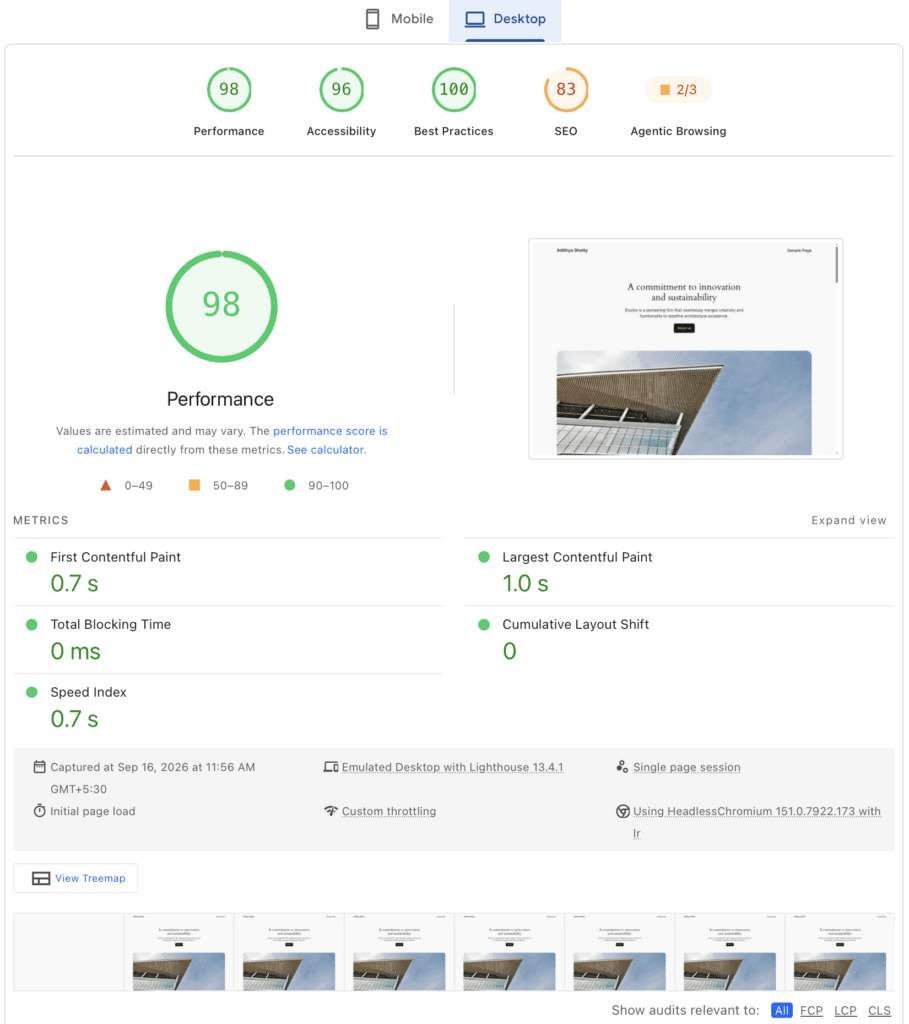
The site hosted on Kinsta got 98/100 for performance, and the page loaded within a second.
TTFB Test
TTFB (Time to First Byte) is a metric that calculates the duration from when the browser makes an HTTP request to the first byte of data received from the server.
For this test, I’m using this free online tool from KeyCDN.
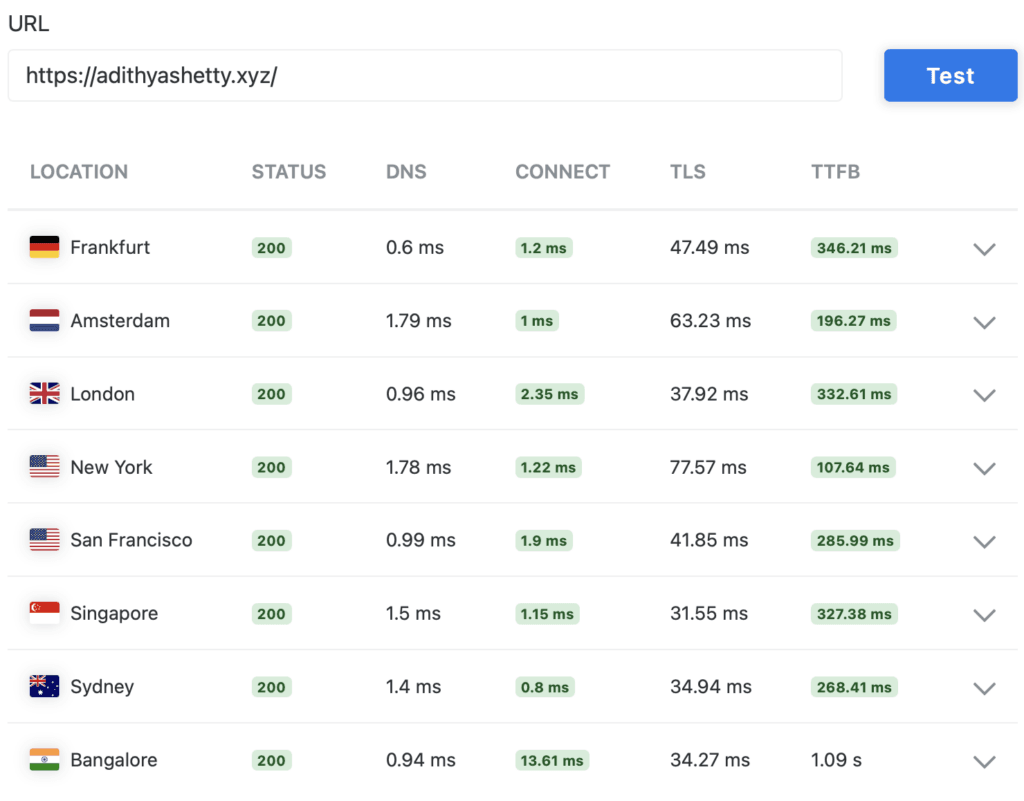
CDN (Content Delivery Network) can help you lower the TTFB of your website. Kinsta uses its built-in CDN powered by Cloudflare’s global network, but the above TTFB results indicate that it’s not the same as the Cloudflare Enterprise CDN that some hosting companies offer.
The average TTFB of the Cloudflare Enterprise CDN provided by Rocket.net was less than 50ms, which uses Argo Smart Routing. But Kinsta seems to be using Cloudflare’s standard shared global Anycast routing, as the response time is slower.
Server Load Test
Let’s do some stress tests of Kinsta. For this, I’ll be using the Loader.io tool.
Without CDN
First, let’s test the server response time of Kinsta without using the CDN. I disabled CDN and Edge Caching. However, Server Caching is active by default (no option to disable it within the panel).
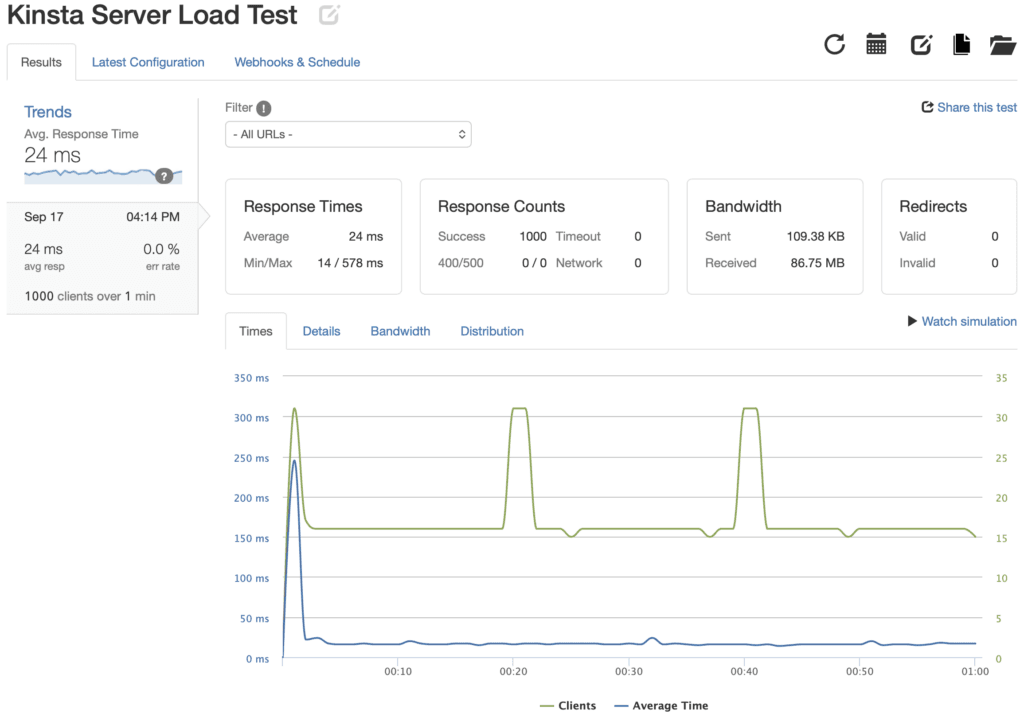
I sent 1000 Clients within a minute. The server response time of Kinsta was 24 ms with zero errors.
With CDN
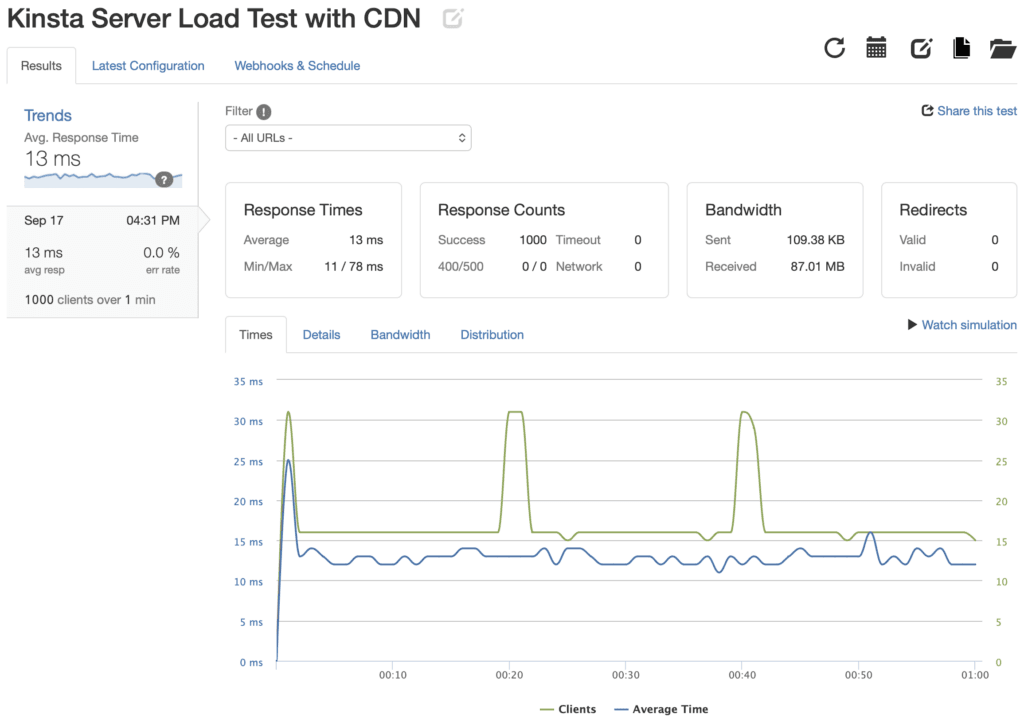
I conducted the same test, but this time by enabling CDN and Edge Caching. The server response time was quicker, with an average of 13 ms.
Using Kinsta’s built-in CDN will definitely help to lower the server response time and save some bandwidth.
It’s also worth noting that enabling Cloudflare-powered CDN will help you get the benefit of edge-level WAF security.
Kinsta Control Panel
Kinsta uses a custom-built control panel called MyKinsta, which offers a centralized dashboard. With it, you can easily access and manage your websites, analytics, DNS management, billing, etc.
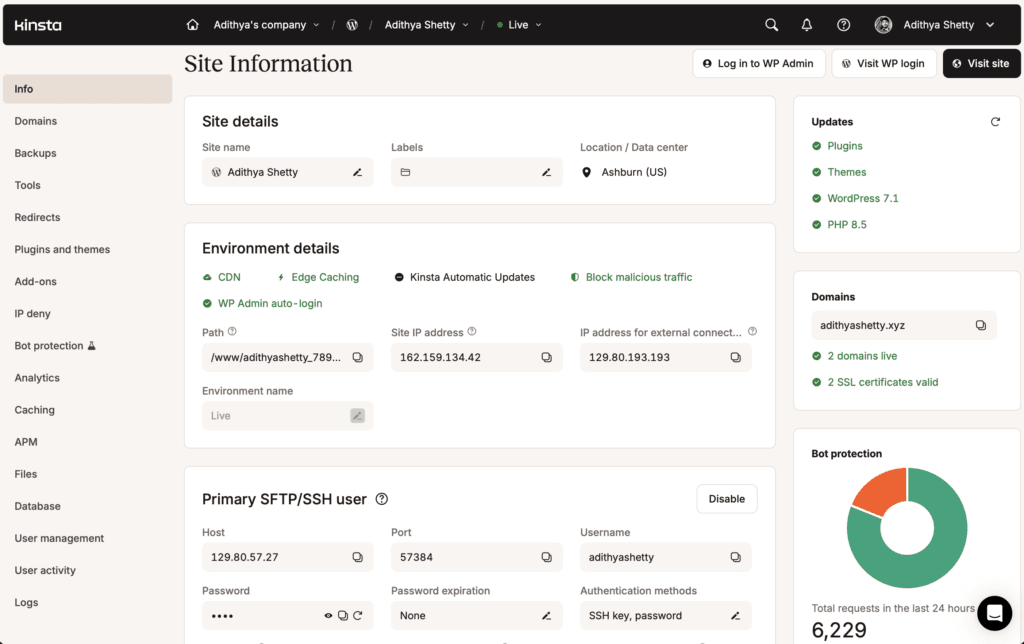
You can also manage backups, caching, file manager, or auto-login to your WordPress sites within the MyKinsta dashboard. Explore the complete dashboard walkthrough on our YouTube channel.
Kinsta’s dashboard interface is user-friendly, modern, and probably better than cPanel.
Tools
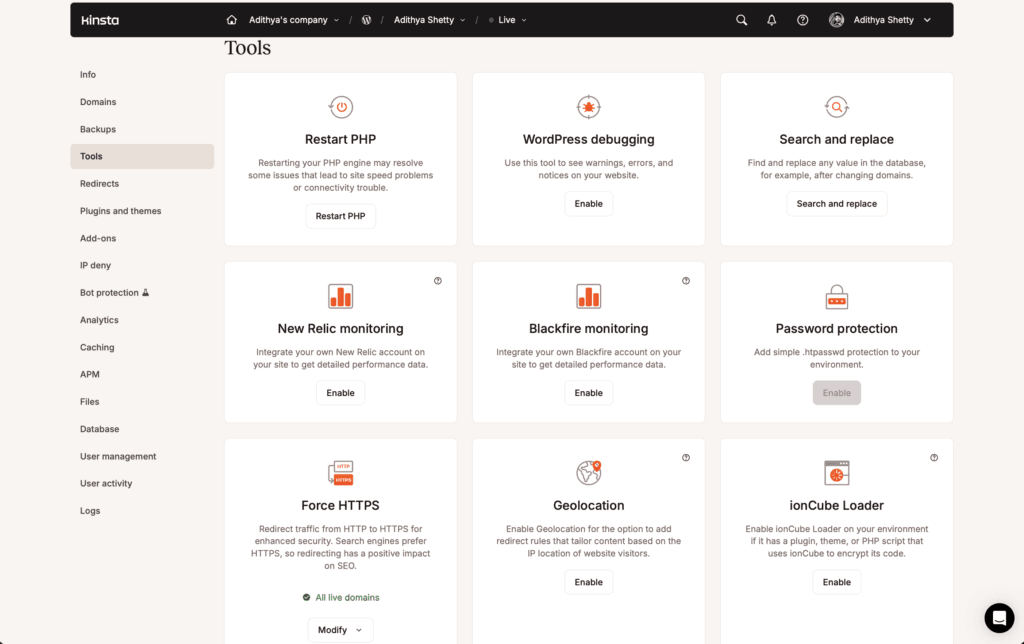
Kinsta offers many tools within its dashboard, like Force HTTPS, Geolocation, WordPress debugging, PHP settings, etc.
These built-in tools eliminate the need to use any WordPress plugins.
Daily Backups
Automated backups are probably one of the main reasons to choose a managed hosting provider. Kinsta automatically takes a backup of your site every day and stores them for 14 days.
They also let you take a manual backup of your entire website, which you can download to your computer.
You can easily use these backups to restore your data in case something goes wrong.
Caching
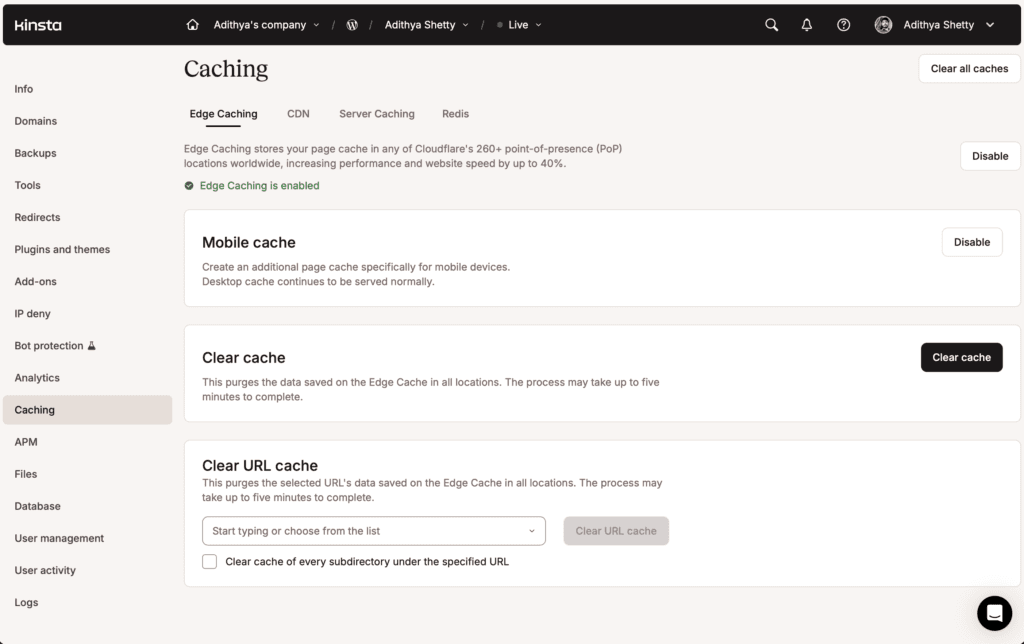
You can manage and control caching settings on Kinsta within their control panel. Kinsta offers a free CDN powered by Cloudflare along with server-level caching built on Nginx FastCGI.
You can also enable Redis here with an add-on plan that costs $100/month per site.
Free Migrations
Kinsta offers unlimited free migrations; their expert team will transfer your WordPress site from any host with zero downtime.
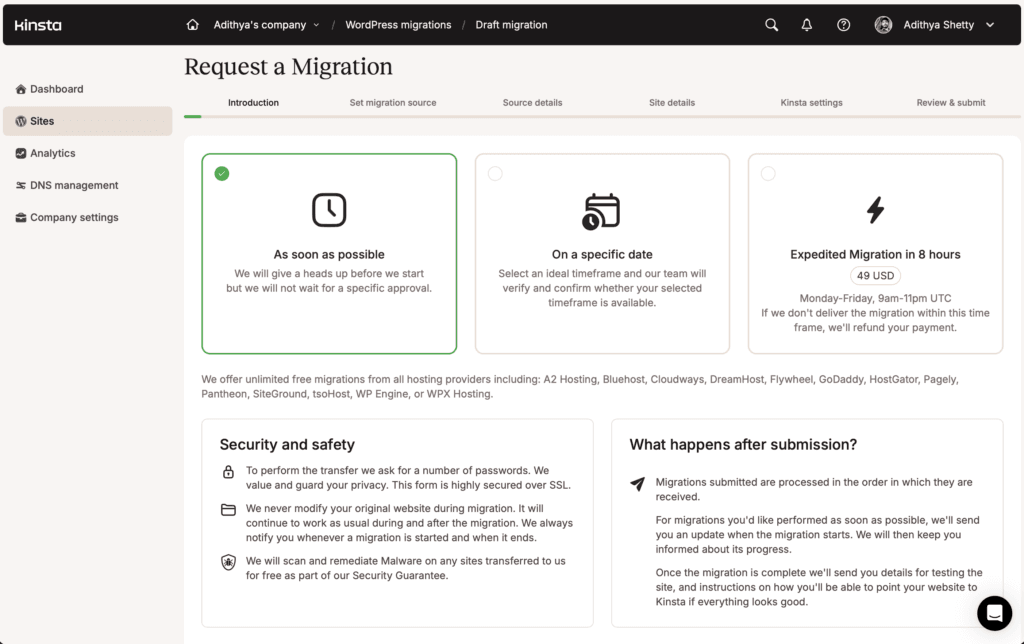
Use their form to fill out the necessary details regarding your current host and the FTP login credentials.
If you want your site to be transferred immediately, you can just pay $49, and they’ll migrate your site in 8 hours.
Uptime
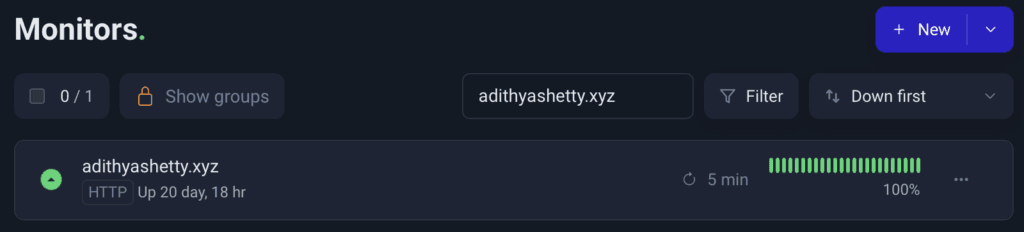
Kinsta offers an SLA-backed (Service Level Agreement) uptime guarantee of 99.99%. I’ve been testing and monitoring Kinsta hosting for nearly a month and haven’t faced any service downtime.
A 99.99% uptime guarantee means your website can be down for a maximum of 52.56 minutes per year. It’s also worth noting that the uptime guarantee doesn’t include scheduled or emergency maintenance.
You can check Kinsta’s status page for recent updates.
Pricing
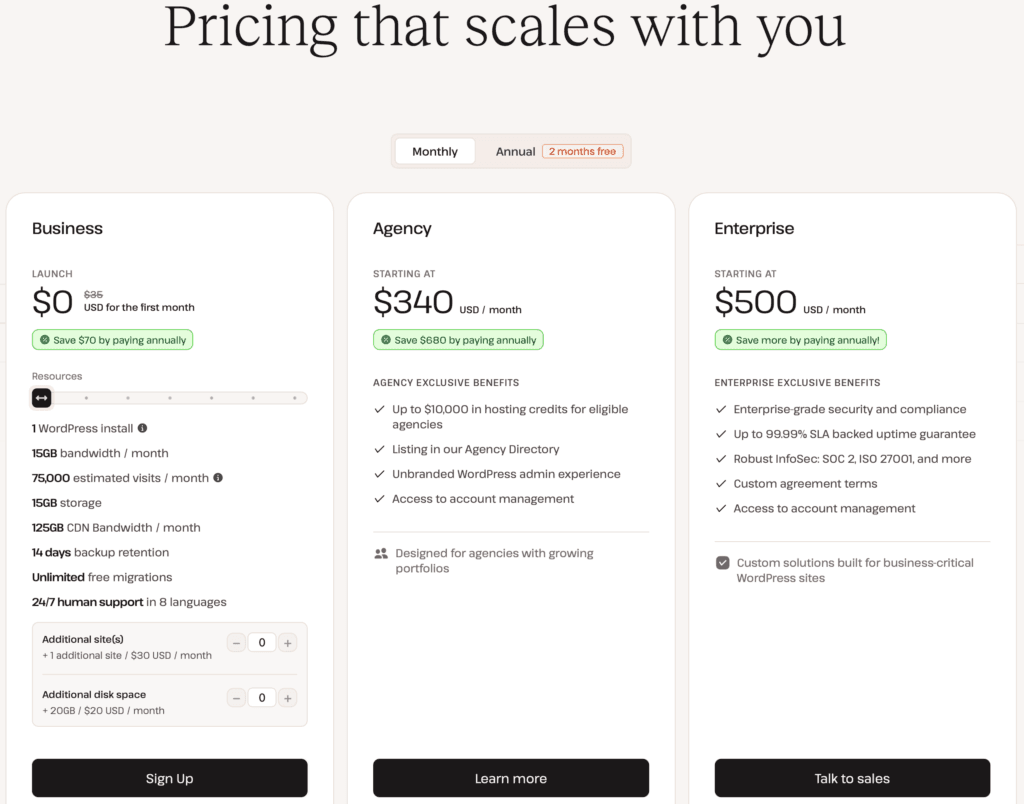
Kinsta offers 3 main structured plans: Business, Agency, and Enterprise.
Let’s explore these plans in detail:
Business
The Business plan has 6 different tiers that can support 1 to 20 websites.
- LAUNCH: This base plan supports 1 WordPress install and starts at $35/mo on the monthly plan. Offers 15 GB bandwidth/mo, 15 GB storage, 75,000 estimated visits/mo, 125 GB CDN Bandwidth/month.
- LAUNCH PLUS: Starts at $59/mo for 1 website. 25 GB bandwidth/mo, 125,000 estimated visits, 25 GB storage.
- BUILD: Supports 2 WordPress installs and starts at $69/mo. 40 GB bandwidth/mo, 200,000 estimated visits/month, and 250 GB CDN Bandwidth/month.
- EXPAND: Starts at $99/mo and supports 5 WordPress Installs. 65 GB bandwidth/mo, 350,000 estimated visits/mo, 40 GB storage, 500 GB CDN Bandwidth/month.
- SCALE: Supports 10 WordPress installs and starts at $169/mo. 125GB bandwidth/month, 50 GB storage, and 750 GB CDN Bandwidth/mo.
- LEAD: Starts at $299/mo and supports 20 WordPress installs. Offers 275 GB bandwidth/mo, 1,500,000 estimated visits/mo, 60 GB storage, and 1,000 GB CDN Bandwidth/month.
Additional site(s) cost $30/mo per site, and additional disk space is priced at $20/mo per 20 GB of storage.
Agency
This plan is ideal for digital or creative agency owners who want to host several websites. There are 3 different tiers:
- AGENCY 20: Supports 20 WordPress installs and costs $340/mo. Offers 250 GB of Server bandwidth, 1,000 GB of CDN bandwidth/mo, 500,000 monthly visits, and 50 GB Storage space.
- AGENCY 40: Starts at $450/mo and supports 40 WordPress installs. 750,000 estimated visits/mo, 500 GB of server bandwidth, and 1,500 GB CDN bandwidth.
- AGENCY 60: Priced at $675/month, this plan supports up to 60 websites. 1,250,000 visits/mo, 750 GB of server bandwidth, 2,500 GB CDN bandwidth, and 150 GB Storage space.
Enterprise
The Enterprise plan starts at $500, and you can get a customized, tailor-made plan with your desired resources. It also offers enterprise-grade security and compliance. You just have to contact Kinsta’s sales team.
All the above plans include two months of free hosting when billed annually.
Add-ons
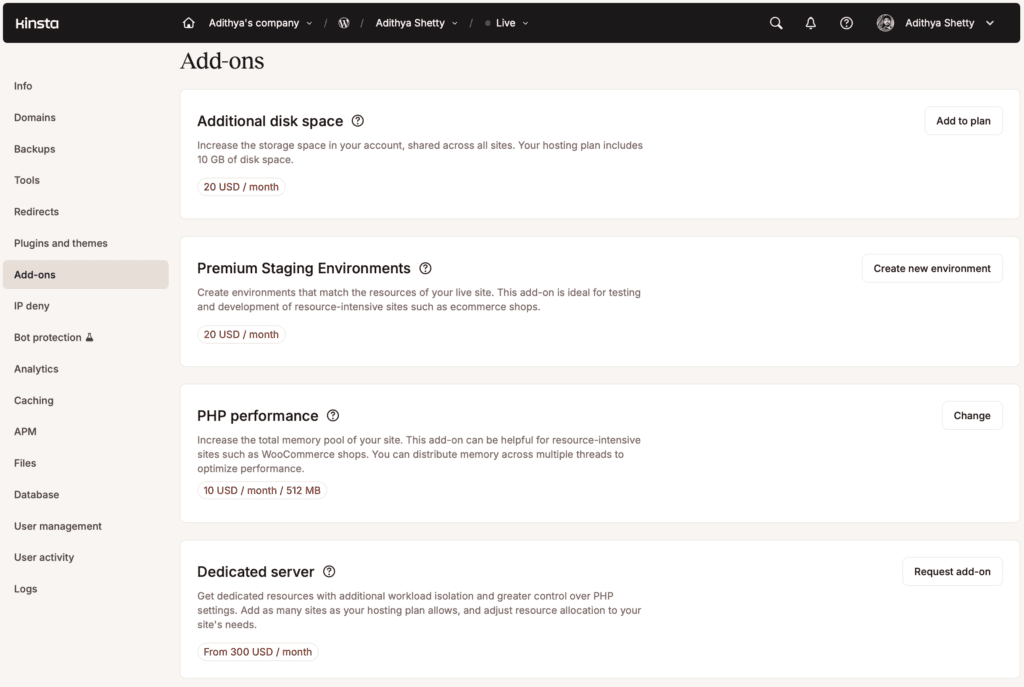
Kinsta offers a lot of Add-ons that you can use to upgrade some features like additional disk space, Premium Staging Environment, Dedicated server, PHP memory, Redis caching, etc.
Customer Support
Kinsta offers Customer Support through Chat, Email, and a ticketing system for existing clients. Kinsta Support includes multiple languages for different countries.
Technical support is only available to existing clients and can be accessed from the MyKinsta dashboard.
I didn’t run into any technical issues while testing Kinsta, so I don’t know much about it. I see some Kinsta users complaining about overage pricing, mediocre support, and lack of PHP memory on the standard plan, which may not be suitable for WooCommerce sites.
You can read more about the customer experience, good and bad, on Trustpilot.
Pros and Cons of Kinsta
Pros
- Beginner-friendly with a centralized dashboard.
- High-performing servers powered by Google Cloud Platform.
- Custom-built CDN (Content Delivery Network) powered by Cloudflare.
- Free unlimited migrations.
- Staging Environment for testing.
- Bot protection and WAF security.
Cons
- No email hosting or domain registration.
- Restricts or blocks Caching, backup, or server-based image optimization plugins
- Some users complain about upselling and overage costs.
- Redis object cache costs $100/mo per site.
- Basic CDN; not as good as Cloudflare Enterprise, which other managed hosting providers offer.
Kinsta Alternatives
Many managed WordPress hosts can be a good alternative to Kinsta, but let’s look at some top hosting here that offer similar features:
Rocket.net: I used Rocket.net for around 4 years before moving my sites into the netcup VPS. Rocket.net offers Cloudflare Enterprise CDN and Redis on all of its managed WordPress and WooCommerce hosting plans. Pricing starts at $30/mo on the monthly plan.
WPX: WPX uses the LiteSpeed web server, which is quite fast and works well with LiteSpeed Cache and QUIC.cloud CDN; this combination helps you reduce TTFB and improve website performance.
Cloudways: Cloudways can be a cheaper alternative to Kinsta, with a free standard version of Redis Object Cache and Cloudflare Enterprise as an Add-on ($4.99mo per site). The base plan pricing starts at $14/mo and offers 1 TB of bandwidth with 25 GB of NVMe Storage. Read my review here.
WP Engine: Similar to Kinsta, WP Engine offers a built-in CDN powered by the Cloudflare network. The base plan starts at $35/mo and includes 75 GB of bandwidth and 10 GB storage.
Final Verdict
Kinsta servers are good since they’re powered by Google Cloud Platform. The benchmark results are impressive for a managed WordPress hosting provider.
Having used Cloudflare Enterprise CDN with Rocket.net, I feel their built-in CDN is a little disappointing.
Advanced users might not like the restrictions they impose on certain WordPress plugins, but beginners might like the centralized dashboard and not having to worry about technical aspects of setting up a CDN and caching plugin.
FAQs
Does Kinsta offer a refund?
Yes, Kinsta offers a money-back guarantee for first-time customers.
Does Kinsta offer CDN?
Yes, Kinsta offers a built-in CDN powered by the Cloudflare network.
Does Kinsta offer Email hosting services?
No, Kinsta doesn’t offer email hosting services.
Does Kinsta offer domain registration?
No, Kinsta doesn’t offer domain registration.
Kinsta Review

Kinsta claims to offer high-performance WordPress hosting with CDN and Edge caching, read my detailed review with benchmarks to see if it's true.
Price: 35
Price Currency: $
4.1
